Architecture & Concepts
This page explains how Domain Context’s components work together — the bridge pattern that connects AI tools to domain knowledge, the module structure, and the hooks that keep context fresh.
The bridge pattern
Section titled “The bridge pattern”Domain Context uses a three-layer chain to make domain knowledge visible to any AI assistant:
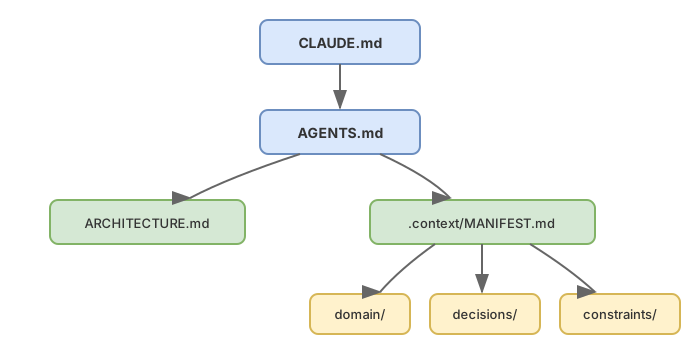
CLAUDE.md is a thin pointer — it imports AGENTS.md via @AGENTS.md and adds any Claude-specific settings. AGENTS.md is the primary instruction file. It is vendor-neutral (originated by OpenAI, adopted broadly), so any AI coding tool can consume it. AGENTS.md references ARCHITECTURE.md for system design and .context/MANIFEST.md for domain knowledge.
This matters for two reasons:
- Tool independence — because AGENTS.md is the primary file, domain context works with any AI assistant, not just Claude Code.
- GSD integration for free — GSD agents read CLAUDE.md at session start. Since CLAUDE.md imports AGENTS.md, they automatically see domain context pointers without any GSD modifications.
Three concerns
Section titled “Three concerns”Domain Context organizes project knowledge into three complementary concerns:
- The How — AGENTS.md contains procedural instructions (build commands, conventions, workflow)
- The What —
.planning/holds current development specs (GSD phases, tasks, research) - The Why —
.context/stores durable domain knowledge (business rules, decisions, constraints)
Module map
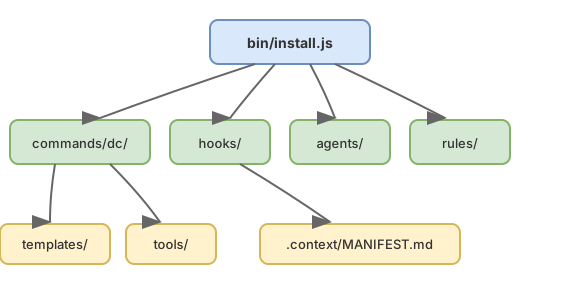
Section titled “Module map”| Module | Purpose |
|---|---|
| commands/dc/ | Six slash commands for managing domain context |
| hooks/ | Session-start freshness check, edit-time reminders, post-edit lint check |
| agents/ | Domain validator subagent |
| rules/ | Formatting guidance for .context/ files |
| templates/ | Scaffolding files for /dc:init |
| bin/ | npm installer (npx entry point) |
Data flow
Section titled “Data flow”The install-to-session lifecycle shows how Domain Context flows from initial setup through active development:

Hook lifecycle
Section titled “Hook lifecycle”Domain Context includes three hooks that run automatically after installation — no configuration needed.
On session start, the freshness check hook scans .context/MANIFEST.md for verified dates. If any entries are older than 90 days, it adds a warning to Claude’s context so stale knowledge gets flagged early.
On file edit, the context reminder hook checks whether the edited file is near a CONTEXT.md. If so, it reminds you to review and update the context file if your changes affect domain knowledge.
On JS file edit, the lint check hook runs ESLint on the edited file and surfaces any violations as additional context, giving Claude immediate feedback before lint errors accumulate.
All three hooks degrade gracefully — if anything goes wrong (missing files, parse errors, timeouts), they exit silently without blocking your session.
.context/ directory structure
Section titled “.context/ directory structure”Every project initialized with Domain Context gets this structure:
.context/ MANIFEST.md # Index of all domain knowledge domain/ # Business rules, models, terminology decisions/ # Architecture decision records (ADRs) constraints/ # External requirements, API contractsMANIFEST.md is the entry point. It lists every domain concept, decision, and constraint with a brief description and a verified date. At roughly 300 tokens, it is cheap for AI tools to scan — they read the index first, then load individual files on demand.
domain/ holds business rules, lifecycle models, and terminology definitions. These are the concepts that developers need to understand but that live outside the code.
decisions/ stores architecture decision records (ADRs) with context, rationale, and consequences. These capture the “why” behind significant tradeoffs.
constraints/ documents external requirements — API contracts, regulatory needs, security policies — that the codebase must respect.
Next steps
Section titled “Next steps”- User Guide — complete workflow from initialization to extraction
- Spec Overview — the specification this tool implements
- CLI Reference — detailed command documentation